
—

Contents
- 1 upBiz SaaS POS Review: The Ultimate Inventory & Accounting PHP Script?
- 1.1 1. Introduction
- 1.2 2. Key Features
- 1.3 3. Usability and Interface
- 1.4 4. Security and Performance
- 1.5 5. Pricing and Value
- 1.6 6. Pros and Cons
- 1.7 7. Frequently Asked Questions (FAQs)
- 1.7.1 1. What is the upBiz SaaS POS script?
- 1.7.2 2. Do I need coding skills to use it?
- 1.7.3 3. What technology is it built on?
- 1.7.4 4. Can I rebrand and customize the script?
- 1.7.5 5. Is it suitable for a single business?
- 1.7.6 6. Where can I buy the upBiz SaaS POS script?
- 1.7.7 7. What kind of support is included with the purchase?
- 1.8 8. Is It Worth Buying?
upBiz SaaS POS Review: The Ultimate Inventory & Accounting PHP Script?
1. Introduction

In today’s competitive business landscape, having an efficient system to manage sales, track inventory, and handle accounting is no longer a luxury—it’s a necessity. For entrepreneurs and developers looking to tap into this market, building a robust SaaS (Software as a Service) platform from scratch can be a monumental task. This is where pre-built solutions come into play. In this detailed CodeCanyon PHP script review, we dive deep into the upBiz SaaS POS ( Point of Sale ) Inventory Accounting PHP script, a comprehensive solution designed to empower you to launch your own multi-tenant business management platform. This script promises an all-in-one package for businesses to handle their daily operations seamlessly. Is it the right foundation for your next big project? Let’s find out. You can explore its full potential and see the live demo on its official CodeCanyon page.
2. Key Features
The upBiz SaaS POS script is not just a simple cash register tool; it’s a full-fledged business management ecosystem. Its feature set is designed to provide immense value to your future subscribers. Here are some of the standout functionalities:
- SaaS & Multi-Tenancy Ready: This is the script’s core strength. You can install it once and sell subscriptions to hundreds or thousands of businesses. Each business (tenant) gets its own isolated, secure environment with its own data, settings, and users. A super-admin dashboard allows you to manage plans, subscriptions, and tenants effortlessly.
- Comprehensive POS Module: The Point of Sale interface is clean, fast, and user-friendly. It supports barcode scanning, handles multiple payment methods, processes sales and returns, and can operate on any device with a web browser, including tablets and desktops.
- Integrated Inventory Management: Go beyond simple sales tracking. This module allows businesses to manage products, add variants (like size and color), track stock levels in real-time across multiple warehouses, manage suppliers, handle purchase orders, and receive low-stock alerts.
- Full Accounting Suite: Unlike many POS scripts, upBiz includes a powerful accounting component. Businesses can manage a chart of accounts, track income and expenses, view detailed ledgers, and generate critical financial reports like Profit & Loss statements and balance sheets.
- Modern Tech Stack: Built on Laravel and Vue.js, this is arguably one of the best PHP script for Laravel Vue developers. This modern stack ensures high performance, robust security, and a snappy, responsive user interface that feels like a native application.
These features combine to create a powerful, market-ready product that you can brand and sell as your own. To see a complete breakdown of every module, view the full feature list here.
3. Usability and Interface
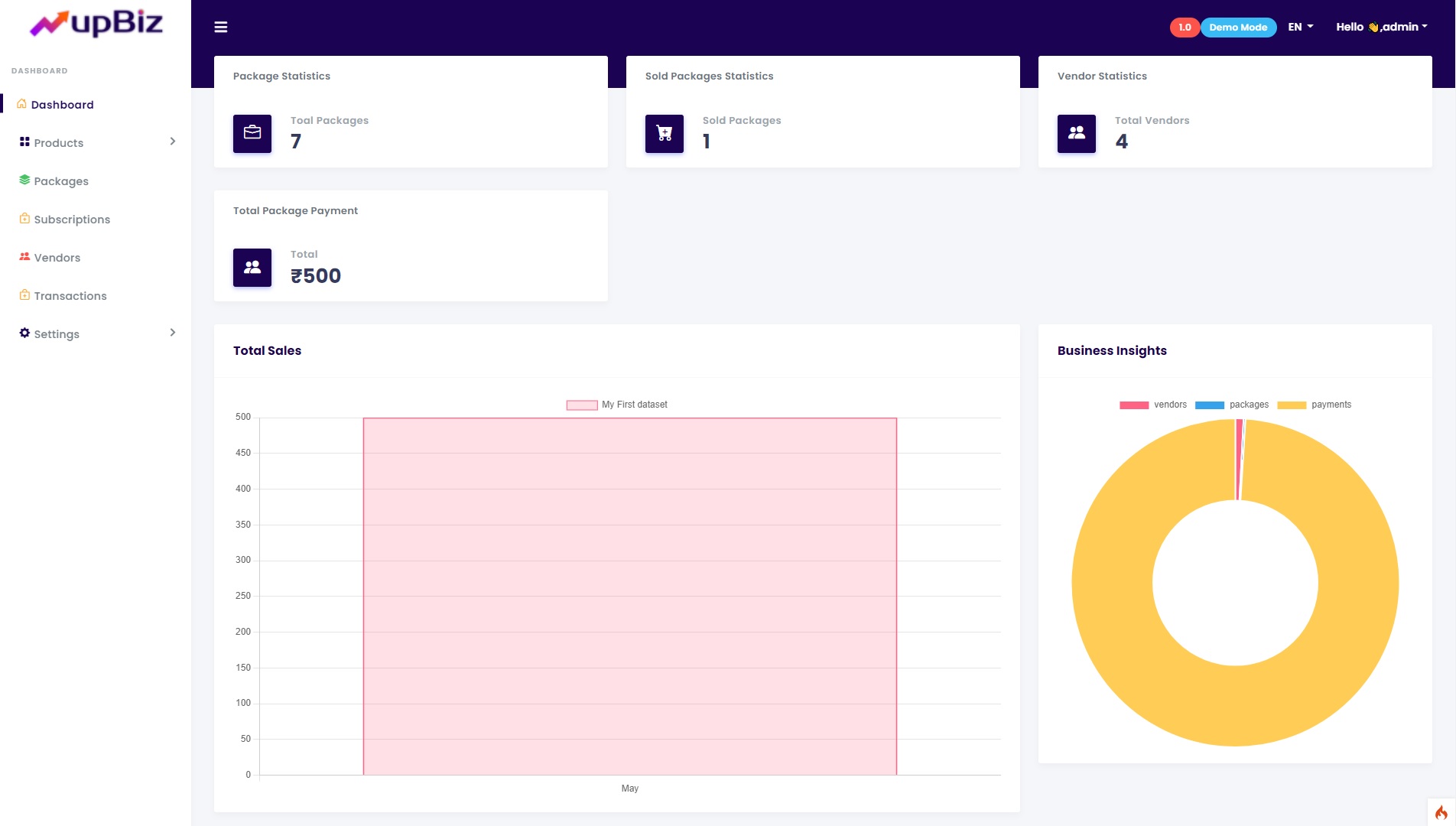
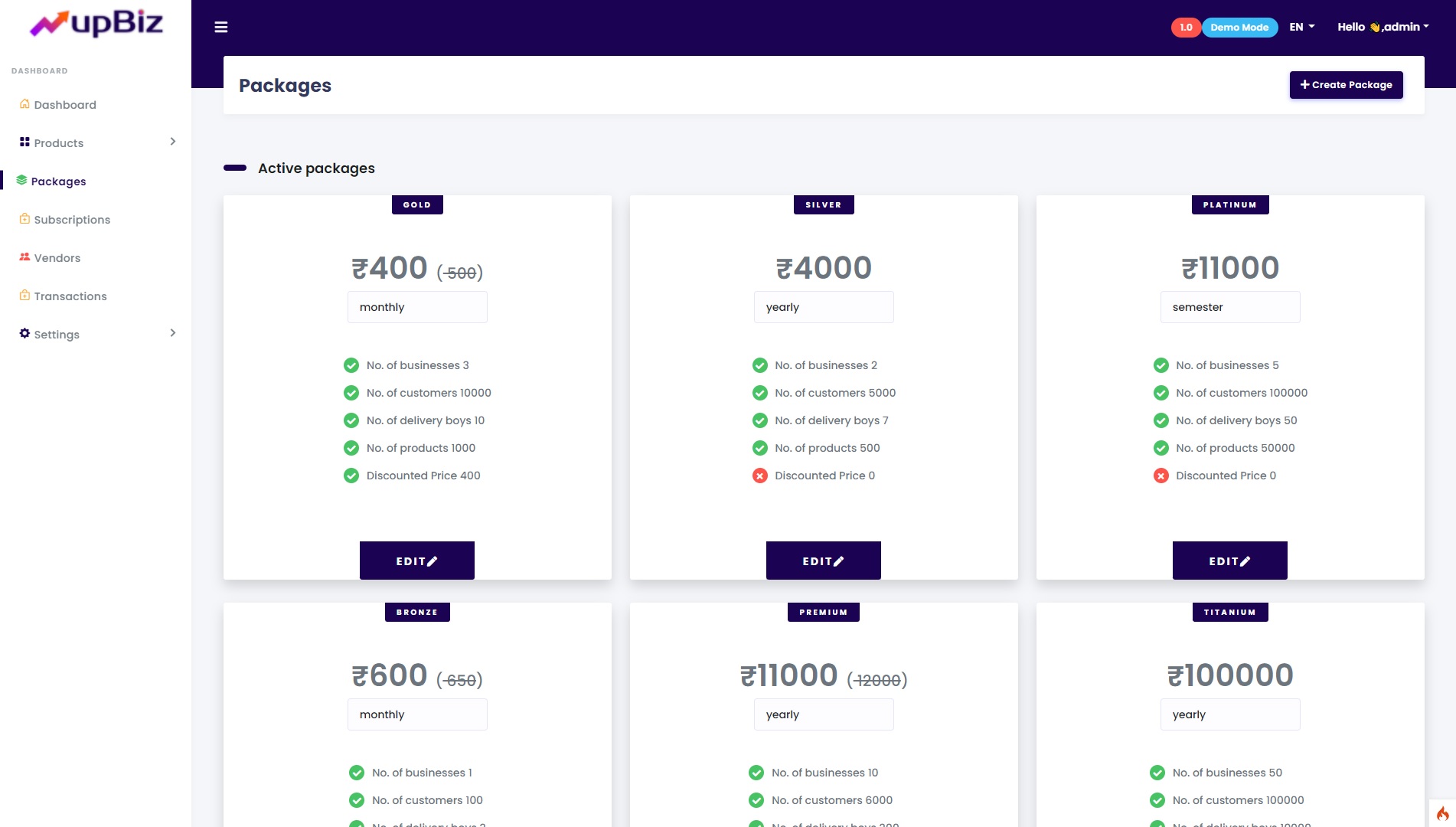
A great script is only as good as its user interface. Fortunately, the upBiz script excels in this area. The UI is clean, modern, and intuitive, which is crucial for a SaaS product that needs to appeal to non-technical business owners. The dashboard provides a clear, at-a-glance overview of key metrics like total sales, purchases, and expenses. Navigation is logical, with a well-organized sidebar that makes it easy to jump between POS, inventory, accounting, and reporting sections.
For the SaaS owner, the Super Admin panel is equally well-designed, providing all the necessary tools to manage the platform without feeling cluttered. The use of Vue.js for the front-end ensures that interactions are fast and smooth, reducing loading times and creating a seamless user experience. While the initial server setup requires some technical knowledge (as expected for a professional script), the day-to-day operation for both the admin and the end-user is straightforward and requires minimal training.
4. Security and Performance
When you’re handling sensitive business and financial data, security is paramount. The upBiz SaaS POS ( Point of Sale ) Inventory Accounting PHP script is built on the Laravel framework, which is renowned for its robust security features. It comes with built-in protection against common vulnerabilities like SQL injection, cross-site scripting (XSS), and cross-site request forgery (CSRF). The multi-tenancy architecture is designed to keep each company’s data completely separate and secure from others.
Performance is another strong point, thanks to its modern tech stack. The combination of a powerful Laravel backend and a reactive Vue.js frontend (SPA – Single Page Application) results in a fast and efficient system. Pages load quickly, and data processing is optimized for a smooth user experience, even as the database grows. Regular updates from the developer ensure that the script stays secure and performs well over time.
5. Pricing and Value
The upBiz SaaS POS script is available on CodeCanyon for a one-time fee. This pricing model offers exceptional value compared to building a similar platform from scratch, which could cost tens of thousands of dollars and take months, if not years, of development time. With this script, you get a market-ready, feature-rich application that you can deploy and start monetizing almost immediately. The one-time purchase gives you lifetime access to the code, allowing for unlimited customization and branding.
When you consider the potential for recurring revenue by selling monthly or yearly subscriptions to businesses, the return on investment is incredibly high. You are essentially buying a complete business-in-a-box for a fraction of the development cost, making it an excellent investment for developers, startups, and digital agencies.
6. Pros and Cons
| Pros | Cons |
|---|---|
| ✅ SaaS-Ready: True multi-tenancy to build a subscription business. | ❌ Technical Setup: Requires a server and basic developer skills to install and configure. |
| ✅ All-in-One Solution: Combines POS, Inventory, and Accounting in one package. | ❌ Learning Curve: The vast number of features may require some time to fully master for the end-user. |
| ✅ Modern Technology: Built with Laravel and Vue.js for excellent performance and security. | ❌ Customization Needs Skills: Significant modifications require knowledge of Laravel and Vue.js. |
| ✅ Excellent Value: One-time payment for a script with high recurring revenue potential. | ❌ Server Costs: You are responsible for your own hosting and maintenance costs. |
7. Frequently Asked Questions (FAQs)
1. What is the upBiz SaaS POS script?
It is a self-hosted PHP script that allows you to create a multi-tenant Software as a Service (SaaS) platform. This platform provides businesses with tools for point of sale, inventory management, and accounting.
2. Do I need coding skills to use it?
To install and manage the script on a server, you will need basic web hosting and technical knowledge. However, your customers (the business owners using the platform) will not need any coding skills, as the user interface is designed to be user-friendly.
3. What technology is it built on?
The script is built on a powerful and modern stack: the Laravel PHP framework for the backend and the Vue.js JavaScript framework for the frontend. This makes it one of the best PHP script for Laravel Vue projects.
4. Can I rebrand and customize the script?
Yes. When you purchase the script, you get access to the source code. This allows you to rebrand it with your own logo and colors, and if you have development skills, you can customize its features to fit your specific business needs.
5. Is it suitable for a single business?
While its main strength is its SaaS capability, you can absolutely use it to run a single, powerful POS system for your own business. You would simply create one tenant for your own operations.
6. Where can I buy the upBiz SaaS POS script?
You can purchase the script exclusively from the Envato Market (CodeCanyon). To ensure you are getting the official version with future updates and support, it’s recommended to buy it directly from the official product page.
7. What kind of support is included with the purchase?
The purchase typically includes 6 months of support from the developer, which covers bug fixes and answers to technical questions about the script’s features. You can also extend this support for an additional fee.
8. Is It Worth Buying?
After a thorough review, the verdict is a resounding yes. The upBiz SaaS POS ( Point of Sale ) Inventory Accounting PHP script is a powerhouse of a tool. It’s not just a script; it’s a complete business foundation. For any developer, entrepreneur, or agency looking to enter the lucrative SaaS market with a high-demand product, this is a phenomenal starting point. The combination of a robust feature set, modern technology, and a one-time purchase price presents an unbeatable value proposition.
It saves you countless hours of development and provides a professional, secure, and scalable platform right out of the box. If you’re ready to launch a comprehensive business management service, this script provides all the tools you need to succeed. Don’t miss the opportunity to build your own SaaS empire. Check out upBiz SaaS POS on CodeCanyon today!
“`