
—

Contents
- 1 GCP Google Wavenet Text to Speech Converter Review: The Ultimate PHP Script?
- 1.1 Key Features of the GCP Google Wavenet Text to Speech Converter
- 1.2 Usability and Interface
- 1.3 Security and Performance
- 1.4 Pricing and Value
- 1.5 Pros and Cons
- 1.6 Frequently Asked Questions (FAQs)
- 1.6.1 1. What do I need to run this script?
- 1.6.2 2. Is it difficult to install?
- 1.6.3 3. Can I customize the look and feel of the website?
- 1.6.4 4. Are the Google WaveNet voices free to use?
- 1.6.5 5. What makes this a “SaaS-ready” script?
- 1.6.6 6. Can I offer both standard and WaveNet voices to my users?
- 1.6.7 7. Where can I purchase this script?
- 1.7 Is It Worth Buying?
GCP Google Wavenet Text to Speech Converter Review: The Ultimate PHP Script?
In today’s content-driven world, high-quality audio is no longer a luxury—it’s a necessity. From video voiceovers and podcasting to accessibility features and e-learning modules, the demand for natural, human-like speech is skyrocketing. While creating this audio manually can be time-consuming and expensive, text-to-speech (TTS) technology offers a powerful alternative. However, not all TTS systems are created equal. Many sound robotic and unengaging. This is where Google’s WaveNet technology changes the game, and the GCP Google Wavenet Text to Speech Converter PHP script brings this power directly to your fingertips. This robust script, available on CodeCanyon, allows developers and entrepreneurs to build their own advanced, SaaS-ready TTS platform. In this detailed CodeCanyon PHP script review, we’ll explore if this is the tool you need to revolutionize your audio content creation.
Key Features of the GCP Google Wavenet Text to Speech Converter

This script isn’t just a simple API wrapper; it’s a comprehensive, feature-packed application built on a modern tech stack. It provides a solid foundation for anyone looking to launch a text-to-speech service or integrate premium voice generation into their projects. Here’s a breakdown of its standout features:
- Superior Voice Quality with Google WaveNet: The core selling point is its integration with Google Cloud’s WaveNet voices. Unlike standard TTS, WaveNet uses a deep neural network to generate speech that is incredibly natural, with realistic intonation and cadence. This script gives you and your users access to this premium technology.
- Extensive Language and Voice Support: Tap into Google’s vast library of over 220 voices across more than 40 languages and variants. This global reach makes the script perfect for creating content for an international audience.
- SaaS-Ready Framework: Built with subscription models in mind, the script includes complete user registration, subscription plans (monthly/yearly), and payment gateway integration (Stripe, PayPal). You can set character limits and features for different pricing tiers, making it easy to monetize your service from day one.
- Advanced SSML Support: With Speech Synthesis Markup Language (SSML) support, users can go beyond simple text conversion. They can control pronunciation, add pauses, adjust pitch, change speaking rates, and add emphasis, giving them granular control over the final audio output.
- Modern and Powerful Tech Stack: This is arguably the best PHP script for Laravel Vue developers looking for a turnkey TTS solution. It leverages the power of Laravel 9 on the backend for security and scalability, while Vue.js on the frontend delivers a fast, responsive, and modern user interface.
- User-Friendly Admin Dashboard: The administrator has full control over the platform through an intuitive dashboard. You can manage users, track usage statistics, configure voice options, set subscription plan details, and customize the application’s appearance. Get your own copy of the GCP Google Wavenet Text to Speech Converter PHP script and see for yourself.
Usability and Interface
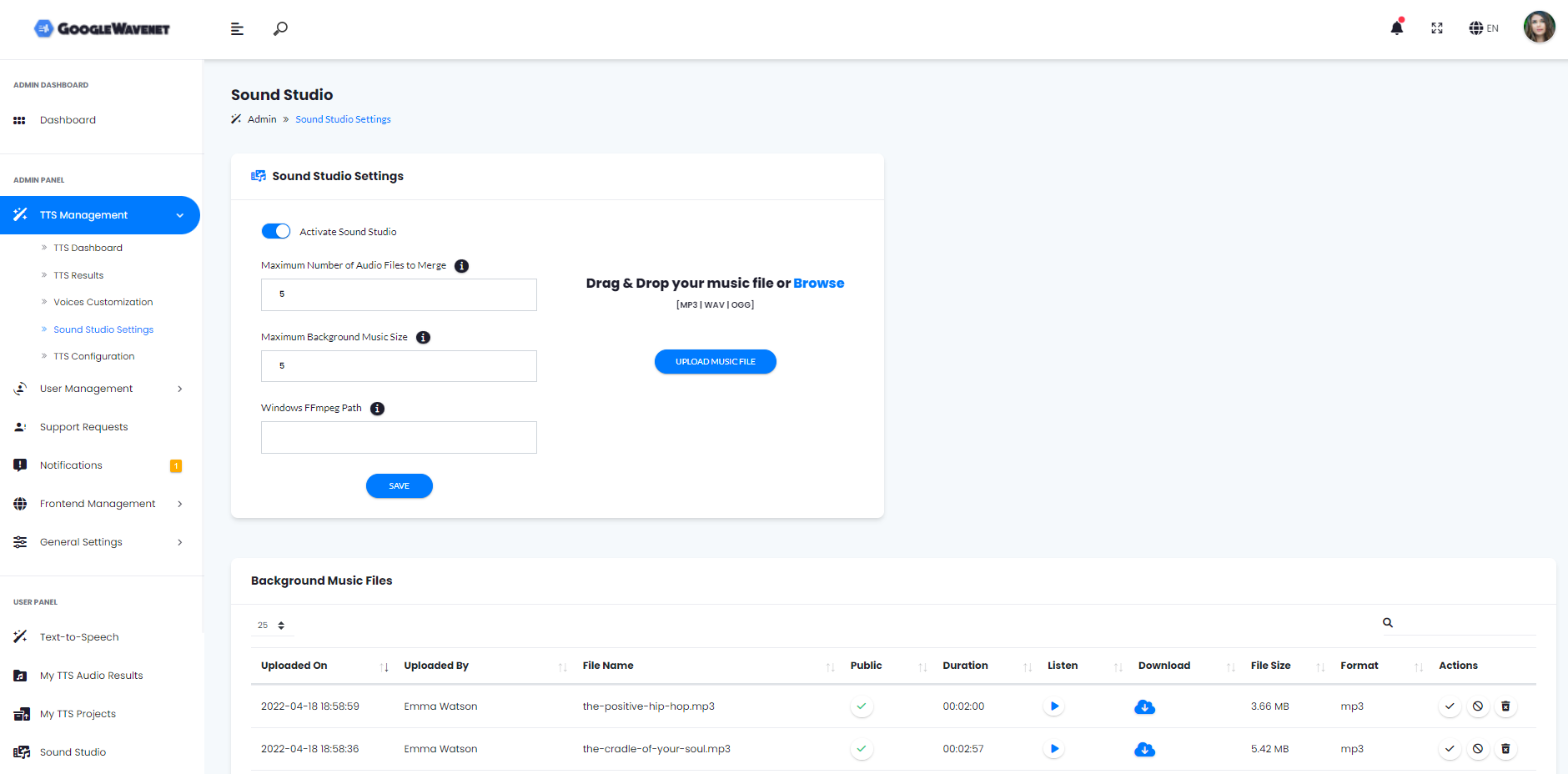
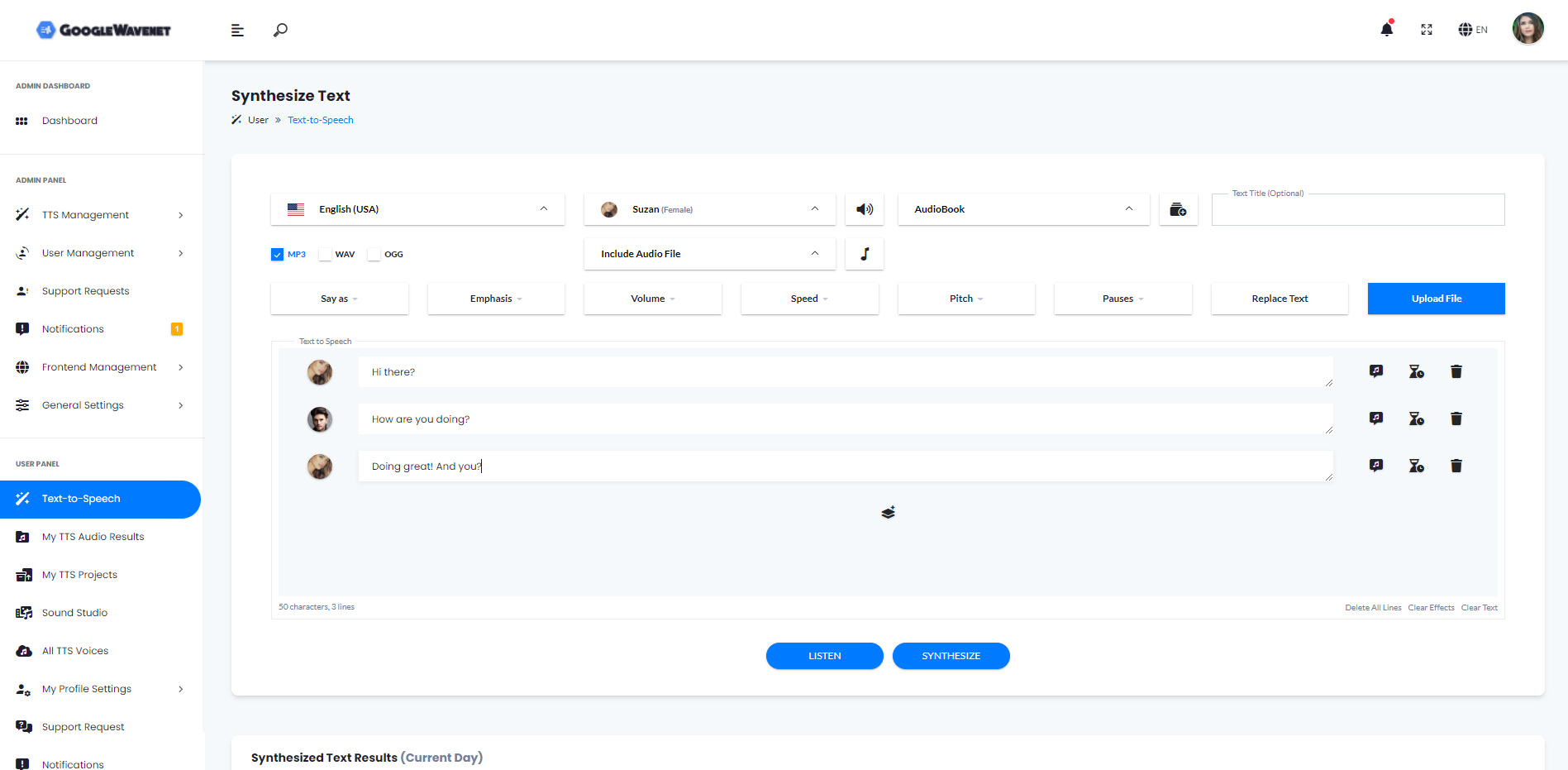
The developers behind this script clearly prioritized user experience. For the end-user, the interface is clean, intuitive, and straightforward. The text input area is prominent, with dropdowns for selecting language, voice, and gender. Advanced options, like SSML effects and audio format selection (MP3, WAV), are easily accessible without cluttering the main workspace. The process of converting text and downloading the audio file is seamless, requiring just a few clicks.
From an administrator’s perspective, the backend dashboard is equally well-designed. Built on a logical layout, it provides quick access to user management, financial analytics, SaaS configuration, and frontend settings. Setting up new subscription plans or viewing user activity is incredibly simple. The provided documentation is comprehensive, guiding you through the installation process and Google Cloud API setup. While some technical knowledge is required for the initial setup, the day-to-day management of the platform is accessible even to non-developers.
Security and Performance
Built on the robust Laravel framework, the GCP Google Wavenet Text to Speech Converter PHP script inherits a strong security foundation. Laravel’s built-in features help protect against common vulnerabilities like cross-site scripting (XSS) and SQL injection. The script handles API keys securely and manages user authentication effectively.
Performance-wise, the application is impressively fast. By using Vue.js for the frontend, it operates as a Single Page Application (SPA), resulting in quick page loads and a smooth user experience. The heavy lifting of voice synthesis is offloaded to Google’s powerful cloud infrastructure, so your server’s resources are primarily used for managing the application logic. This architecture ensures that the script remains responsive and scalable, even with a growing number of users.
Pricing and Value
The script is available on CodeCanyon for a one-time purchase fee. This single payment gives you lifetime access to the script and includes six months of author support, which can be extended. When you consider the cost of developing a similar SaaS platform from scratch—factoring in hundreds of hours of development, design, and testing—the price offers exceptional value.
It’s important to note that while the script is a one-time purchase, you will incur ongoing costs for using the Google Cloud Text-to-Speech API. Google charges based on the number of characters you convert. However, they offer a generous free tier, making it affordable to get started and scale your costs as your user base grows. This model provides a low-cost entry point to a potentially lucrative business.
Pros and Cons
| Pros | Cons |
|---|---|
| Access to hyper-realistic WaveNet voices. | Requires a Google Cloud Platform account and API setup. |
| Fully featured, SaaS-ready platform out of the box. | Ongoing API usage costs from Google. |
| Modern and secure tech stack (Laravel & Vue.js). | Initial server setup requires some technical knowledge. |
| Excellent value for a one-time purchase price. | Customization beyond the admin panel may require a developer. |
| Comprehensive admin panel for easy management. |
Frequently Asked Questions (FAQs)
1. What do I need to run this script?
You will need a web server that meets the requirements for Laravel 9 (e.g., PHP 8.0+, specific extensions), a database (like MySQL), and a Google Cloud Platform (GCP) account with the Text-to-Speech API enabled.
2. Is it difficult to install?
The script comes with detailed documentation that walks you through the installation process. If you are familiar with deploying Laravel applications, it should be straightforward. Beginners may need to follow the instructions carefully but it is a manageable process.
3. Can I customize the look and feel of the website?
Yes, the admin panel provides options for changing logos, colors, and other frontend elements. For deeper customizations, you will need to edit the Vue.js and CSS files, which requires web development knowledge.
4. Are the Google WaveNet voices free to use?
No. While the script facilitates their use, the voices themselves are a product of Google Cloud. Google charges for API usage based on the number of characters processed, but they provide a significant free monthly allowance, which is great for new businesses.
5. What makes this a “SaaS-ready” script?
It includes all the core features needed to run a subscription-based service: user registration, multi-tiered subscription plans, character limits per plan, and integrated payment gateways like Stripe and PayPal.
6. Can I offer both standard and WaveNet voices to my users?
Yes, the script allows you to configure which voices are available, including Google’s standard (less expensive) and premium WaveNet voices. You can even restrict certain voices to higher-paying subscription tiers.
7. Where can I purchase this script?
You can buy the GCP Google Wavenet Text to Speech Converter PHP script exclusively on the CodeCanyon marketplace. Click here to view the product page and purchase your license.
Is It Worth Buying?
Absolutely. If you are a developer, entrepreneur, or content creator looking to leverage the power of high-quality, AI-driven voice synthesis, this script is a phenomenal investment. The cost of building a comparable platform from the ground up would be thousands of dollars and months of work. This script provides a production-ready, secure, and scalable solution for a small fraction of that cost. It’s perfect for launching a TTS SaaS business, creating an internal tool for your company, or adding value to an existing application.
The combination of Google’s best-in-class WaveNet technology with a robust Laravel and Vue.js foundation makes this a standout product. For anyone serious about automated audio creation, the GCP Google Wavenet Text to Speech Converter PHP script is a powerful, cost-effective, and highly recommended solution.
“`