
Contents
- 1 GoEvent PHP Script Review: Launch Your Own Event Management SAAS Platform
- 1.1 Diving Deep: A Look at GoEvent’s Core Features
- 1.2 Usability and Interface: A Modern Experience
- 1.3 Security and Performance
- 1.4 Pricing and Value: A Smart Investment
- 1.5 Pros and Cons of GoEvent
- 1.6 Frequently Asked Questions (FAQs)
- 1.6.1 What server requirements are needed for GoEvent?
- 1.6.2 Do I need to be a developer to use this script?
- 1.6.3 Is this a one-time payment?
- 1.6.4 Can I add my own branding and logo?
- 1.6.5 How does the SAAS subscription model work?
- 1.6.6 Where can I buy the GoEvent script?
- 1.6.7 Can I add more features or payment gateways?
- 1.7 Is It Worth Buying? Our Final Verdict
GoEvent PHP Script Review: Launch Your Own Event Management SAAS Platform
In today’s digital-first world, the demand for online event management and ticketing platforms has skyrocketed. From webinars and virtual conferences to local workshops and concerts, organizers need robust tools to succeed. But what if you could be the one providing this solution? Building a Software-as-a-Service (SAAS) platform from the ground up is a monumental task, requiring significant time, investment, and technical expertise. This is where pre-built solutions become a game-changer. The GoEvent Create Your Own Events (SAAS) PHP script offers a powerful, ready-to-deploy foundation for entrepreneurs looking to enter this lucrative market. This script allows you to launch a multi-tenant platform where users can sign up, create, and manage their own events, while you earn revenue through subscription plans. Get started with GoEvent today and build your own event empire.
Diving Deep: A Look at GoEvent’s Core Features
This isn’t just a simple event listing script; it’s a comprehensive SAAS business in a box. The feature set is designed to empower both the platform owner (the admin) and the end-users (the event organizers). This detailed CodeCanyon PHP script review highlights why GoEvent stands out, particularly for those looking for a modern, scalable solution.
Complete SAAS Architecture
- Subscription Plans: As the admin, you can create multiple subscription tiers (e.g., Free, Basic, Pro) with different limitations on events, attendees, or features.
- Integrated Payment Gateways: It comes ready with popular payment processors like Stripe and PayPal, making it easy to automate subscription billing and collect payments securely.
- Multi-Tenancy: Each registered user gets their own sandboxed environment to manage their events, attendees, and branding, ensuring data privacy and a personalized experience.
- Super Admin Dashboard: A powerful backend gives you full control over the platform. Manage users, oversee subscriptions, configure settings, and monitor the overall health of your business.
Robust Event Management Tools
- Effortless Event Creation: Users can create detailed event pages with descriptions, schedules, speaker information, and image galleries.
- Advanced Ticketing System: Organizers can create multiple ticket types (e.g., Early Bird, VIP, General Admission) with different prices and quantities.
- Attendee Management: A centralized dashboard allows organizers to view attendee lists, check in guests, and communicate with them via email notifications.
- Customization and Branding: Users can customize their event pages with their own logos and color schemes to match their brand identity.

Built on a modern technology stack, GoEvent is arguably one of the best PHP script for Laravel Vue developers looking for a solid foundation. Its modular code and powerful frameworks ensure both performance and flexibility. Explore all GoEvent features on CodeCanyon.
Usability and Interface: A Modern Experience
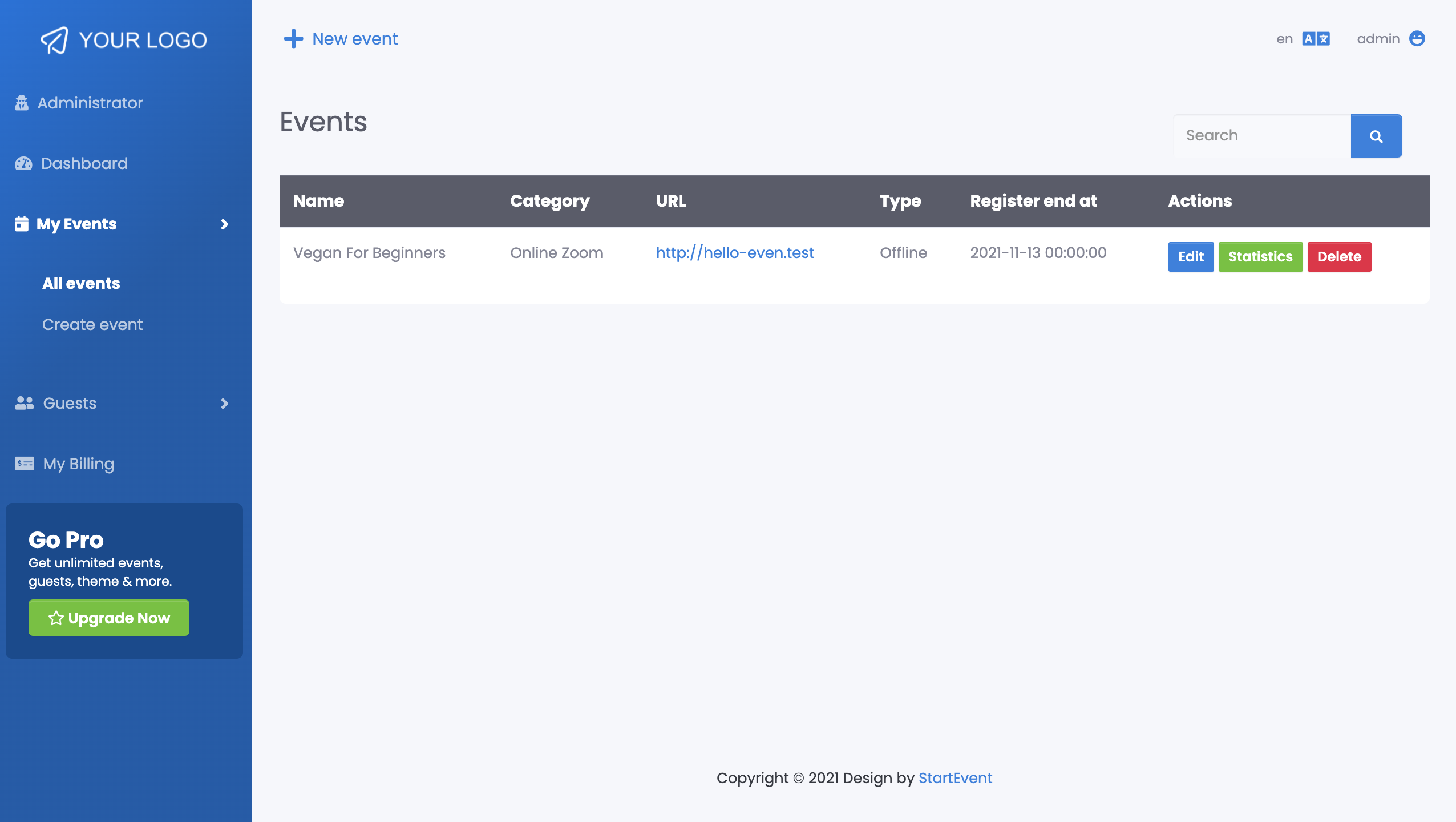
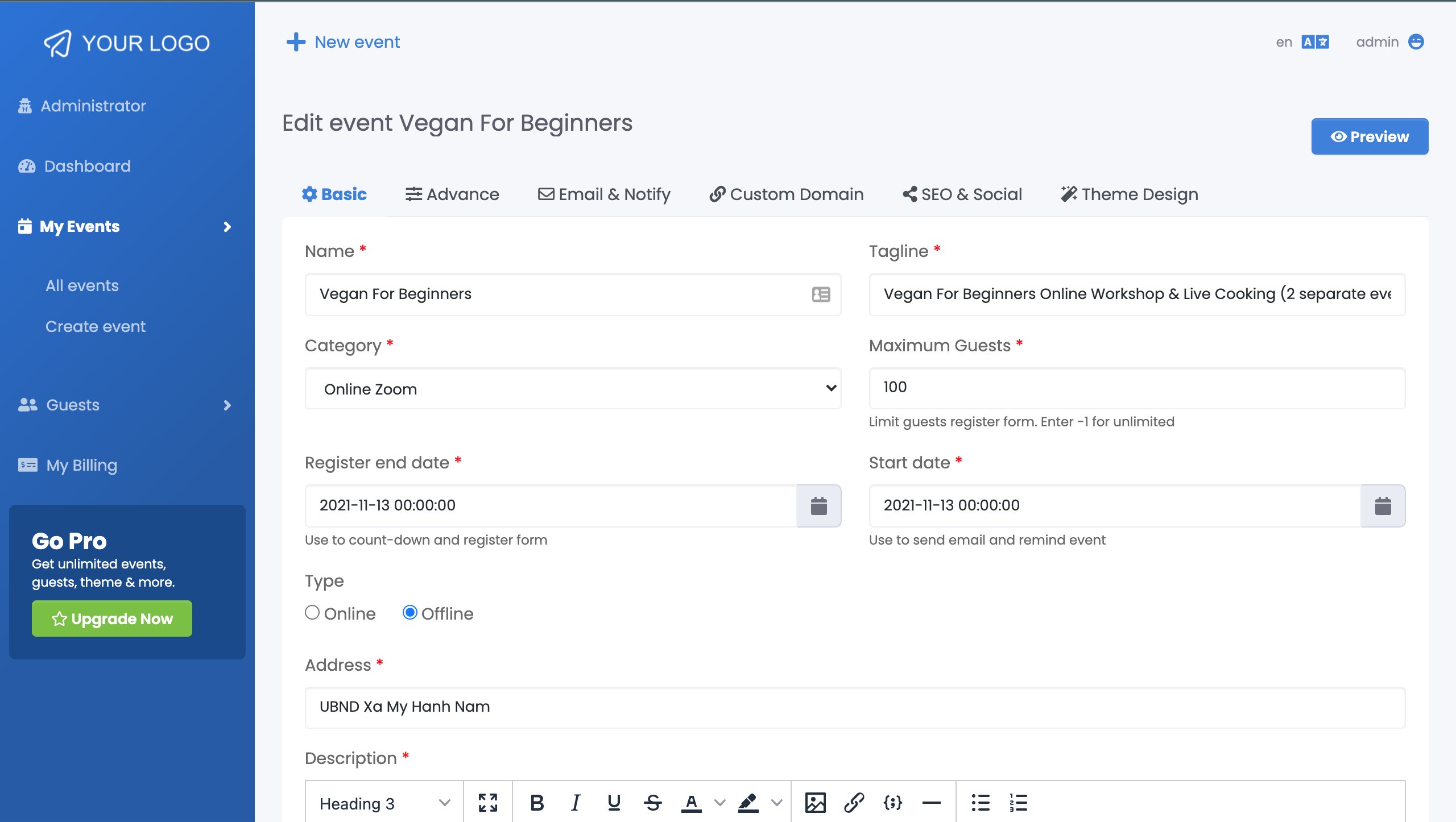
The user experience is a critical factor for any SAAS platform, and GoEvent delivers. Thanks to its construction with Laravel on the backend and Vue.js on the frontend, the interface is fast, responsive, and intuitive. For the end-user (the event organizer), the dashboard is clean and logically laid out. Creating an event, setting up tickets, and managing attendees is a straightforward process that requires minimal technical knowledge. The step-by-step event creation wizard is particularly helpful for new users.
For the script owner (the super admin), the installation and setup process is well-documented. While it requires basic server management knowledge (typical for any PHP script), the configuration is streamlined. The admin panel provides a clear overview of all business metrics, from new sign-ups to total revenue. The separation of concerns between the admin and user dashboards makes managing the entire ecosystem efficient and hassle-free.
Security and Performance
Running a platform that handles user data and financial transactions demands high standards of security and performance. The GoEvent Create Your Own Events (SAAS) PHP script is built on Laravel, one of the most secure PHP frameworks available. It benefits from Laravel’s built-in protections against common web vulnerabilities like Cross-Site Scripting (XSS) and SQL injection. Payment processing is handled by trusted third-party gateways like Stripe and PayPal, so sensitive financial data never touches your server, drastically reducing your security liability.
Performance-wise, the combination of a well-optimized Laravel backend and a reactive Vue.js frontend results in fast page load times and a smooth user experience. The code is clean and follows best practices, ensuring it can scale as your user base grows. Of course, overall performance will also depend on your hosting environment, so choosing a reliable server is key.
Pricing and Value: A Smart Investment
The pricing model on CodeCanyon is one of GoEvent’s most attractive aspects. You pay a one-time fee for the script license, which includes future updates and 6 months of author support. Compared to the tens of thousands of dollars and months of development time it would take to build a similar SAAS platform from scratch, the value is exceptional. The Regular License allows you to use the script for your own project, while the Extended License is required if you intend to charge end-users for the service (which is the core of the SAAS model).
This one-time investment gives you a turnkey business ready to generate recurring revenue. The potential return on investment is massive, making the GoEvent Create Your Own Events (SAAS) PHP script an incredibly cost-effective entry point into the event management market.
Pros and Cons of GoEvent
| Pros | Cons |
|---|---|
| Complete SAAS model out-of-the-box with subscriptions. | Requires technical knowledge for server setup and installation. |
| Modern and high-performance tech stack (Laravel & Vue.js). | Author support is limited to 6 months (can be extended for a fee). |
| One-time payment offers excellent long-term value. | Ongoing costs for hosting, domain, and maintenance are separate. |
| Clean code and good documentation for developers. | Advanced customizations may require hiring a developer. |
Frequently Asked Questions (FAQs)
What server requirements are needed for GoEvent?
GoEvent runs on a standard LAMP/LEMP stack. You will need a server with PHP (version specified in the documentation), MySQL, and standard extensions like OpenSSL, Mbstring, and Tokenizer. It’s compatible with most modern shared hosting or VPS providers that support Laravel applications.
Do I need to be a developer to use this script?
To install and manage the script on a server, you will need some technical proficiency, including knowledge of uploading files via FTP/SSH, creating a database, and running Composer commands. However, once installed, both the admin and user dashboards are user-friendly and do not require coding skills to operate.
Is this a one-time payment?
Yes, the purchase on CodeCanyon is a one-time payment for the script license. This includes lifetime updates for the script. You can choose to pay extra to extend the author support period beyond the initial 6 months.
Can I add my own branding and logo?
Absolutely. The script is designed to be white-labeled. The super admin can easily change the site name, logo, and color scheme from the admin panel to match your brand identity.
How does the SAAS subscription model work?
As the platform owner, you create different subscription packages (e.g., Free, Standard, Premium) in the admin panel. When a user signs up, they choose a plan. The system automatically handles billing through integrated gateways like Stripe or PayPal and restricts user features based on their chosen plan.
Where can I buy the GoEvent script?
You can purchase the official and latest version of the GoEvent script exclusively on the Envato Market (CodeCanyon). Buying from the official source ensures you receive legitimate software, future updates, and access to author support. You can purchase the GoEvent script here.
Can I add more features or payment gateways?
Yes. Since you get access to the full source code, a competent PHP/Laravel developer can extend the script’s functionality, integrate new payment gateways, or customize features to meet your specific business needs.
Is It Worth Buying? Our Final Verdict
After a thorough review, the answer is a resounding yes—if you are an entrepreneur, developer, or agency looking to launch an event management SAAS platform without starting from zero. The GoEvent Create Your Own Events (SAAS) PHP script provides an incredible amount of value for a one-time price. Its robust feature set, modern technology stack, and scalable architecture make it a top contender in its category.
It successfully bridges the gap between a simple tool and a full-fledged business solution. By handling the complex backend logic of subscriptions, payments, and multi-tenancy, it allows you to focus on marketing your platform and growing your user base. For anyone serious about entering the event tech space, this script is a powerful and strategic investment. Ready to build your business? Download GoEvent from CodeCanyon and get started today!
“`